
Forgot your Farm Admin password? No worries — resetting it is quick and easy. Just follow the steps below to get back into your account and continue managing your farm operations without interruption.
Step-by-Step Guide to Resetting Your Password #
1. Go to the Farm Admin Login Page #
Open your browser and go to the Farm Admin website:
👉 https://farmadmin.app/login
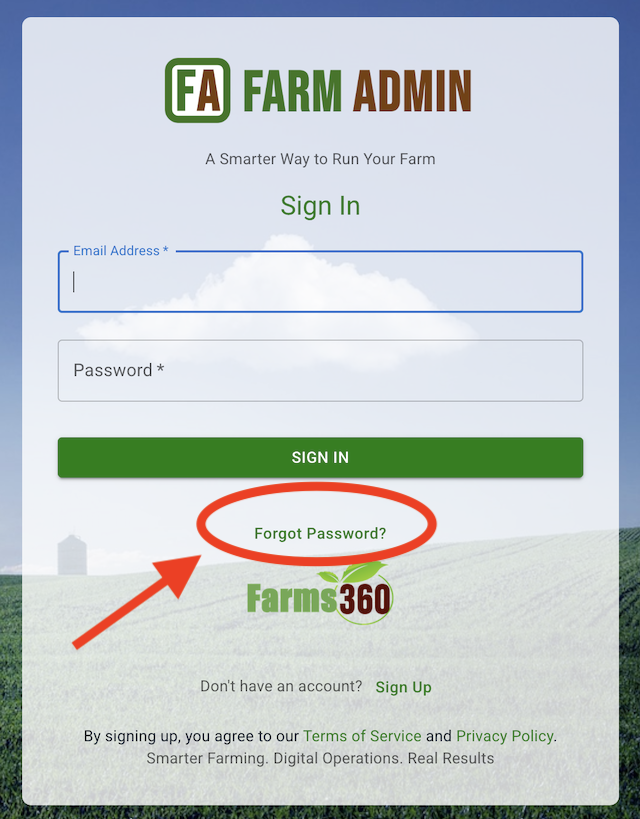
2. Click on “Forgot Password?” #
On the login screen, click the “Forgot Password?” link just below the login form.
3. Enter Your Email Address #
Type the email address you used to register your Farm Admin account, then click “Send Reset Link.”
⚠️ Make sure to enter the correct email. If you don’t receive an email within a few minutes, check your spam folder.
4. Check Your Email Inbox #
You’ll receive an email from Farm Admin with the subject line:
“Reset Your Farm Admin Password”
Click the “Reset Password” button in the email. This will take you to a secure page where you can create a new password.
5. Set a New Password #
Enter your new password twice to confirm. Make sure it meets the following criteria:
- At least 8 characters
- Includes a number
- Includes a capital letter
Click “Submit” to complete the reset.
6. Log In With Your New Password #
You’ll be redirected back to the login page. Enter your email and new password to access your Farm Admin dashboard.
Having Trouble? #
If you didn’t receive the reset email, or if the link expired:
- Double-check your email address for typos.
- Look in your spam/junk folder.
- Request a new reset link.
- Still stuck? Contact our support team at help@farmadmin.app.
Tips for Keeping Your Account Secure #
- Don’t reuse old passwords.
- Avoid using common words or easily guessed information.
- Change your password regularly, especially if you access the platform from shared devices.
Need help with something else? Browse our Help Center or contact support anytime!


